I help companies build products with LLMs and share what I learn along the way. I write about topics like evals, fine-tuning, and infrastructure for LLMs. I have over 25 years of industry experience with Machine Learning which informs my pragmatic approach to solving problems.
New Blog Post: A Field Guide to Rapidly Improving AI Products
|
Hello folks! Over the last 2 years, I've helped 35+ companies improve their AI products. I distilled my approach into this guide, which covers error analysis, synthetic data, eval-human alignment, involving domain experts, optimizing # of experiments & more I appreciate you receiving this, but if you want to stop, simply unsubscribe • • •
👉(web version has extras like videos, images, tables and more) 👈 A Field Guide to Rapidly Improving AI ProductsPublished on March 24, 2025 Most AI teams focus on the wrong things. Here’s a common scene from my consulting work: AI TEAM Here’s our agent architecture – we’ve got RAG here, a router there, and we’re using this new framework for… ME
[Holding up my hand to pause the enthusiastic tech lead.]“Can you show me how you’re measuring if any of this actually works?” … Room goes quiet This scene has played out dozens of times over the last two years. Teams invest weeks building complex AI systems, but can’t tell me if their changes are helping or hurting. This isn’t surprising. With new tools and frameworks emerging weekly, it’s natural to focus on tangible things we can control – which vector database to use, which LLM provider to choose, which agent framework to adopt. But after helping 30+ companies build AI products, I’ve discovered the teams who succeed barely talk about tools at all. Instead, they obsess over measurement and iteration. In this post, I’ll show you exactly how these successful teams operate. You’ll learn:
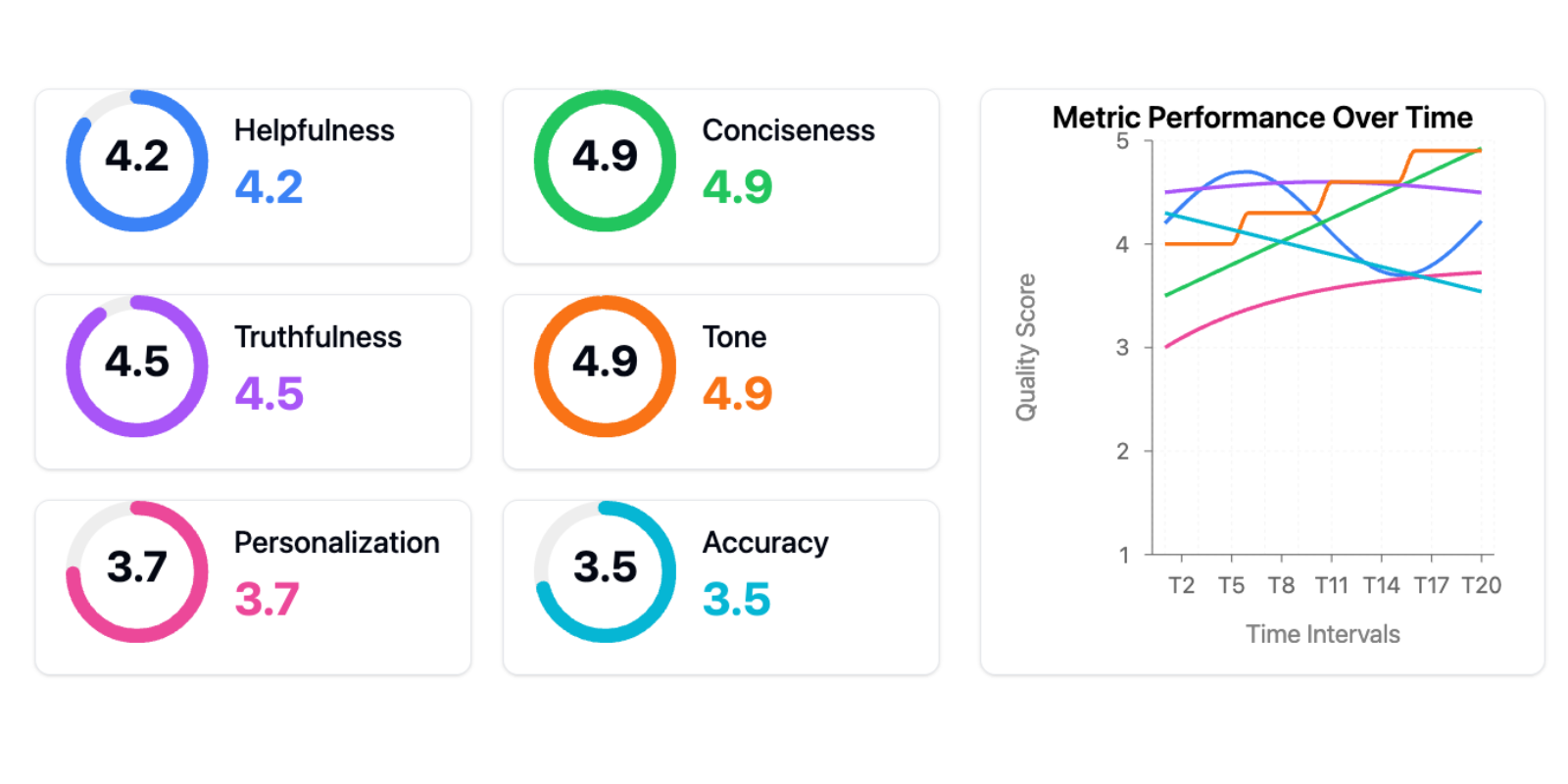
I’ll explain each of these topics with real examples. While every situation is unique, you’ll see patterns that apply regardless of your domain or team size. Let’s start by examining the most common mistake I see teams make – one that derails AI projects before they even begin. 1. The Most Common Mistake: Focus on Tools Over ProcessThe “tools first” mindset runs deep in AI development. It’s not just about architecture diagrams and frameworks – even when teams try to be data-driven, they often reach for tools instead of process. Let me show you what this looks like in practice. One client proudly showed me this evaluation dashboard:
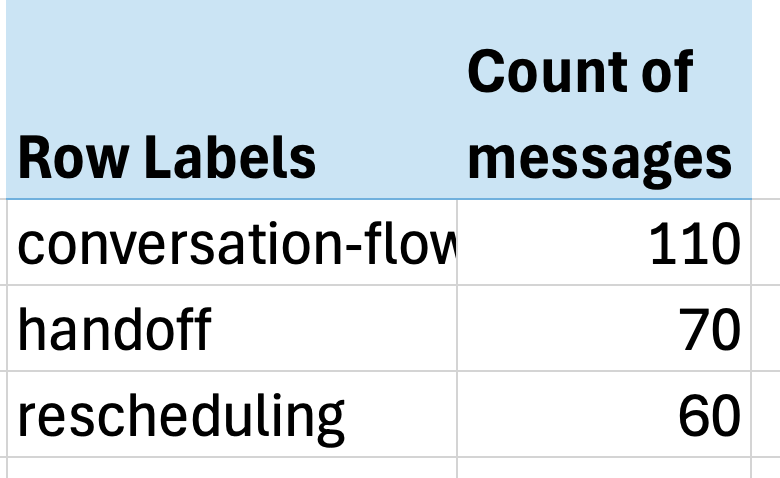
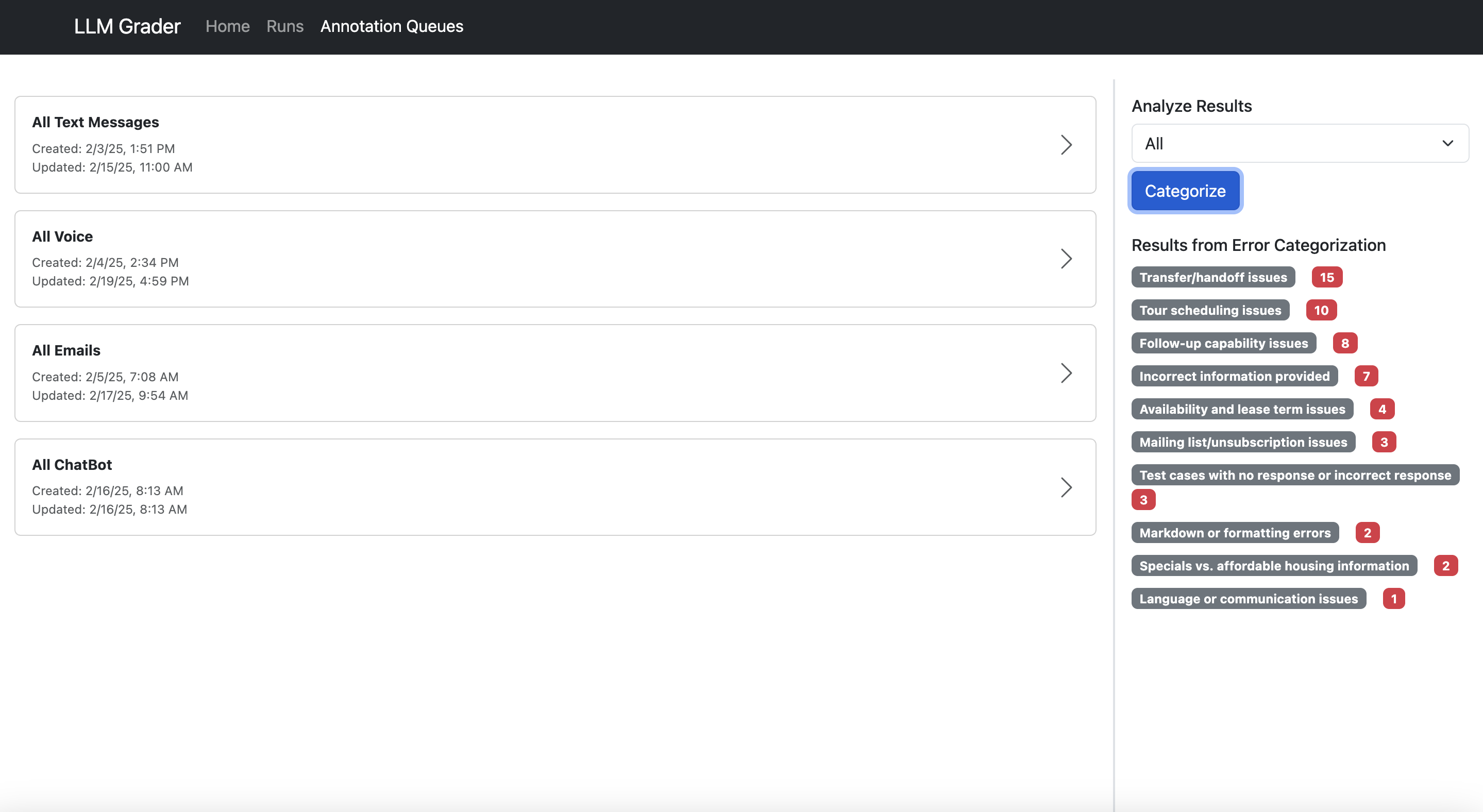
The kind of dashboard that foreshadows failure. I’ve written about this before. This is what I call the “tools trap” – the belief that adopting the right tools or frameworks (in this case, generic metrics) will solve your AI problems. It’s particularly dangerous because it feels like progress. But without meaningful measurement, you’re flying blind. Generic metrics are worse than useless – they actively impede progress in three ways: First, they create a false sense of measurement and progress. Teams think they’re data-driven because they have dashboards, but they’re tracking vanity metrics that don’t correlate with real user problems. I’ve seen teams celebrate improving their “helpfulness score” by 10% while their actual users were still struggling with basic tasks. It’s like optimizing your website’s load time while your checkout process is broken – you’re getting better at the wrong thing. Second, too many metrics fragment your attention. Instead of focusing on the few metrics that matter for your specific use case, you’re trying to optimize multiple dimensions simultaneously. When everything is important, nothing is. What’s the alternative? Building your own metrics and methods of evaluation in a data-driven way. Many people are skeptical when I suggest they need custom metrics. “Look at your data” sounds simple, but what does it actually mean in practice? Let me share a story from Jacob, the founder of Nurture Boss, a company building AI assistants for the apartment industry. Jacob built a simple viewer that let his development team examine conversations between their AI and users. Next to each conversation was a space where they could add notes, listing all the failure modes they observed in an open-ended way. By parallelizing this work across developers, Jacob’s team quickly annotated dozens of conversations. As team members scanned through these notes, clear patterns emerged. Through this process of error analysis, they discovered their AI was struggling with date handling – a seemingly simple task that was failing 66% of the time. Users would say “let’s schedule a tour two weeks from now” and the AI would suggest random dates, sometimes even in past years. Instead of immediately reaching for new tools, they looked at actual conversation logs, categorized the types of date-handling failures, built specific tests to catch these issues, and measured improvement on these metrics. The result? They improved their date handling success rate from 33% to 95%. The solution didn’t require new tools – it required understanding the problem. So what does focusing on this annotation process give you? - Metrics specific to your task that you can actually measure - Systematic ways of improving those metrics - A sense of progress throughout every step of the way I recommend watching Jacob explain this process himself: Your job is no longer about wrangling tools to work in your stack; it’s about creating processes that work for you and your team. And the most powerful process – the one that consistently delivers the highest ROI – is structured error analysis. 2. Everyone Skips Error Analysis (And It’s The Highest ROI Activity)Now let’s dive deeper into how to conduct effective error analysis. It sounds boring – it’s not as exciting as trying the latest LLM or implementing a new agent framework. But it’s the single most valuable activity in AI development, and I’ve never seen a team regret investing in it. Let me show you how this played out at NurtureBoss. When thinking about potential error types, you can take one of two approaches: “top-down” or “bottom-up.” With a top-down approach, you start with evaluation metrics common in the AI community like “hallucination” or “toxicity,” plus metrics unique to your task. At NurtureBoss, they might have wanted to measure customer frustration since their AI chatbot interacts directly with apartment seekers. Top-down is ok, but I find it’s better to start with a bottom-up approach. A bottom-up approach forces you to look at actual data and let the metrics naturally emerge. Let me describe how Jacob’s team implemented their bottom-up approach at NurtureBoss. We started with a simple spreadsheet where each row represented a conversation. In one column, team members wrote open-ended notes on anything good or bad the AI did in that conversation, with each row annotated independently. This process revealed latent evaluation criteria that wouldn’t have emerged in a top-down approach. Next, we fed annotations into a LLM and asked it to build a taxonomy of common failure modes. A second LLM call then mapped each row to a specific failure mode label. Finally, we created a pivot table of failure modes and counts. The results were striking: just three issues accounted for over 60% of all problems:
Excel Pivot Tables are a simple tool, but they work!
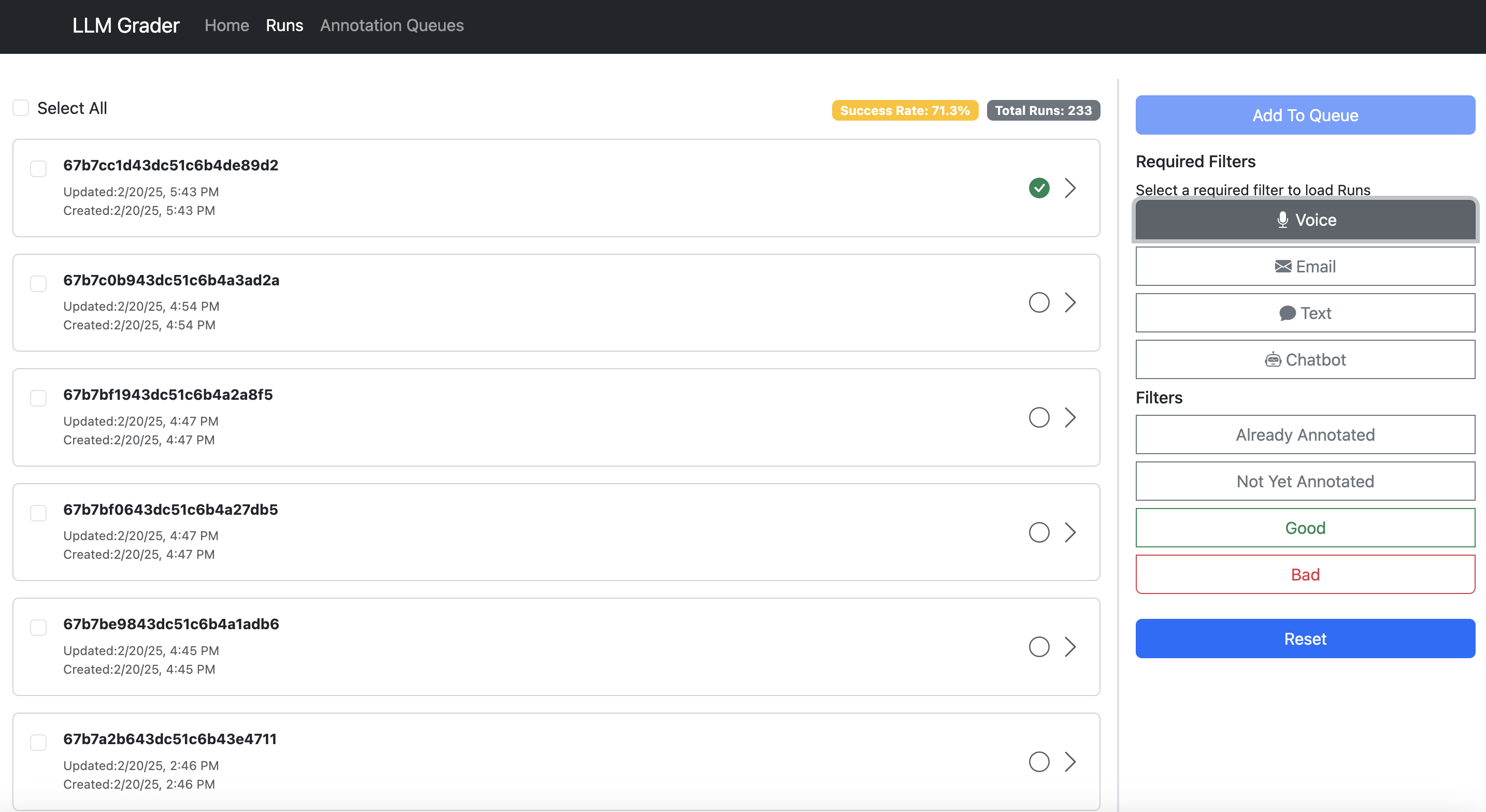
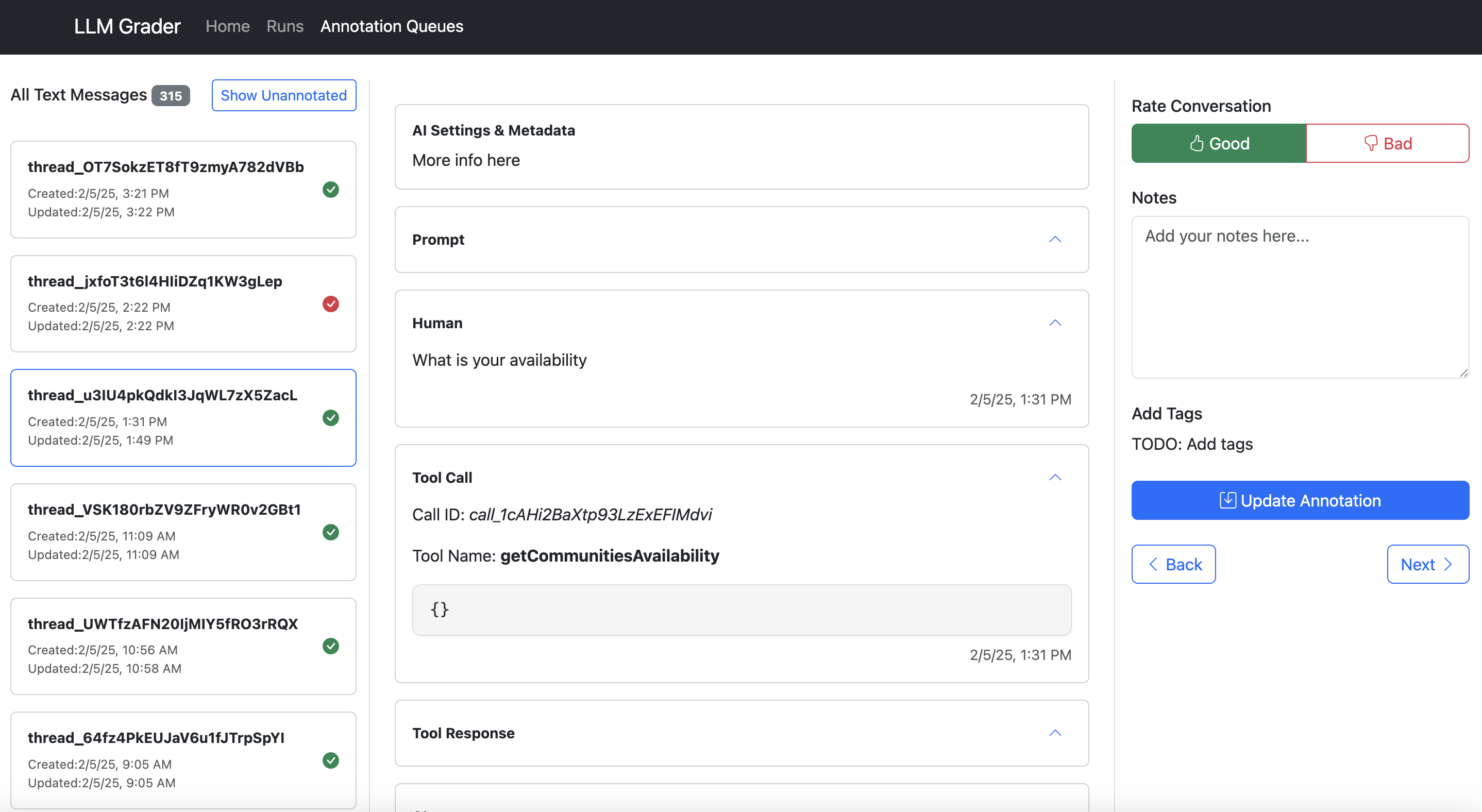
The impact was immediate. Jacob paused our evaluation work – not because it wasn’t valuable, but because they had uncovered so many actionable insights that his team needed several weeks just to implement fixes for the problems we’d already found. This simple exercise had revealed more concrete opportunities for improvement than they had discovered in all their previous attempts at measurement. The key is combining systematic analysis with domain expertise. Technical teams often miss crucial business context, while business teams may lack the tools to analyze patterns systematically. The magic happens when you bring these perspectives together. Let me share a concrete story about how top-down metrics in isolation can lead you astray, even when they feel perfectly customized to your use case. A recruiting platform I consulted with was using AI to generate initial outreach emails to candidates. They tracked success using edit distance – measuring how much recruiters modified the AI’s output. This seemed like an ideal custom metric for their specific needs: less editing should mean better AI performance. But when we conducted error analysis on specific examples with the goal of reducing edit distance, we discovered something startling: many recruiters on this platform were non-native speakers who were introducing grammatical errors and awkward phrasing into AI-generated text. When we showed both versions to hiring managers (the ultimate judges of quality), they consistently rated the less-edited AI versions as significantly better (which surprised me too). No dashboard or pre-defined metric would have caught this fundamental misalignment. If you’d like to see error analysis in action, we recorded a live walkthrough here. This brings us to a crucial question: How do you make it easy for teams to look at their data? The answer leads us to what I consider the most important investment any AI team can make… 3. The Most Important AI Investment: A Simple Data ViewerThe single most impactful investment I’ve seen AI teams make isn’t a fancy evaluation dashboard – it’s building a customized interface that lets anyone examine what their AI is actually doing. I emphasize customized because every domain has unique needs that off-the-shelf tools rarely address. When reviewing apartment leasing conversations, you need to see the full chat history and scheduling context. For real estate queries, you need the property details and source documents right there. Even small UX decisions – like where to place metadata or which filters to expose – can make the difference between a tool people actually use and one they avoid. I’ve watched teams struggle with generic labeling interfaces, hunting through multiple systems just to understand a single interaction. The friction adds up: clicking through to different systems to see context, copying error descriptions into separate tracking sheets, switching between tools to verify information. This friction doesn’t just slow teams down – it actively discourages the kind of systematic analysis that catches subtle issues. Teams with thoughtfully designed data viewers iterate 10x faster than those without them. And here’s the thing: these tools can be built in hours using AI-assisted development (like Cursor or Loveable). The investment is minimal compared to the returns. Let me show you what I mean. Here’s the data viewer built for NurtureBoss (which we discussed earlier):
Search and filter sessions
Annotate and add notes
Aggregate and count errors Here’s what makes a good data annotation tool:
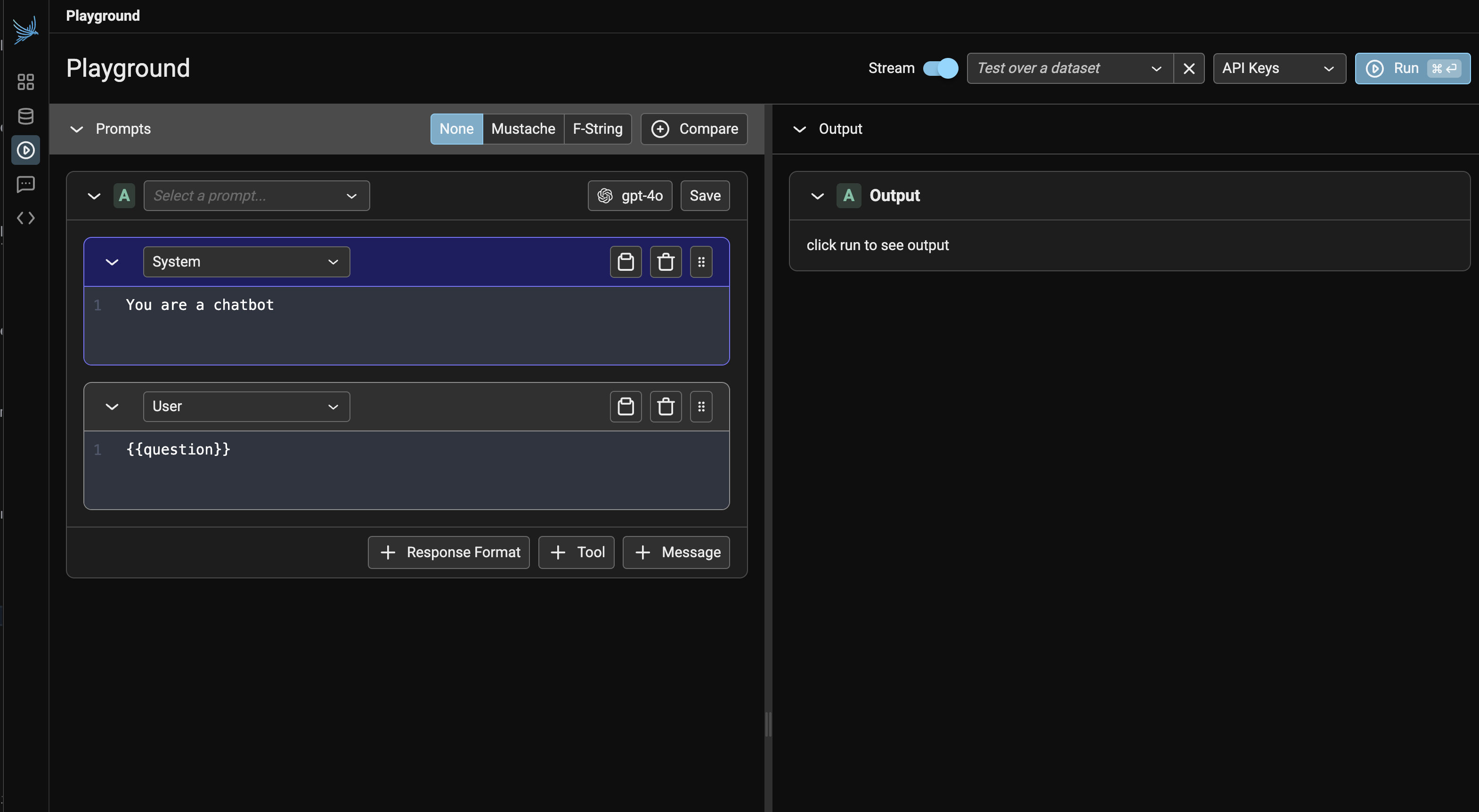
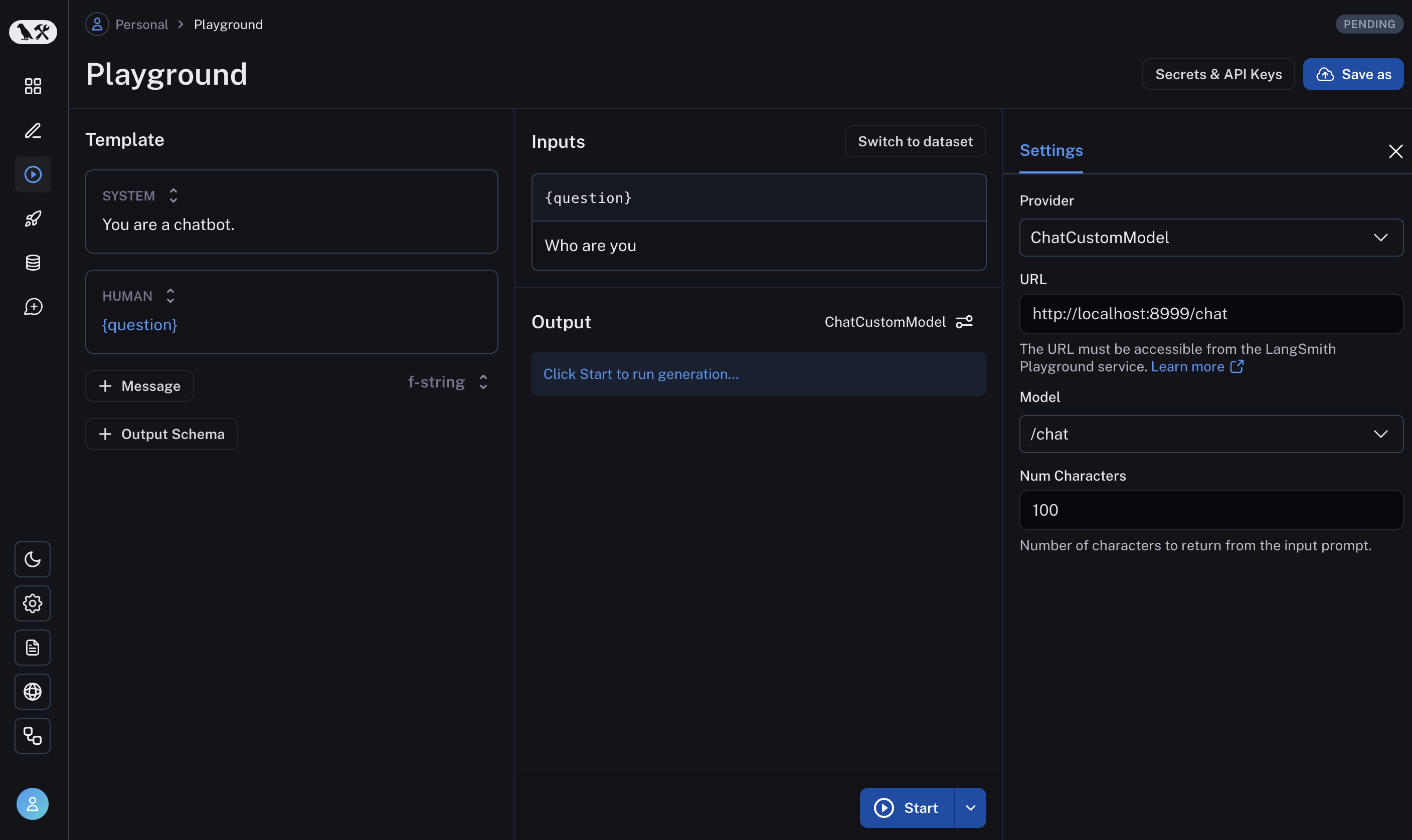
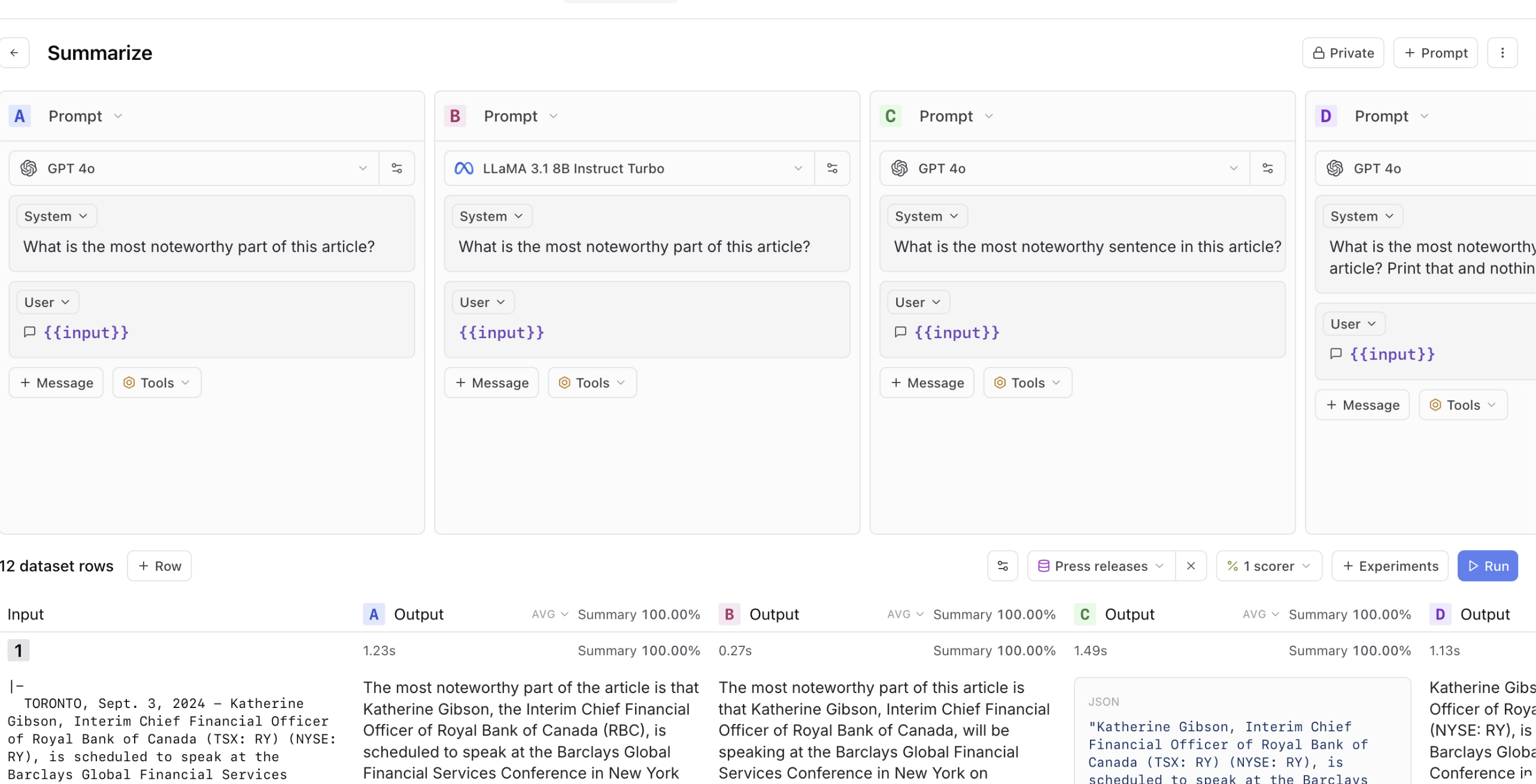
It doesn’t matter what web frameworks you use - use whatever you are familiar with. Because I’m a python developer, my current favorite web framework is FastHTML coupled with MonsterUI, because it allows me to define the back-end and front-end code in one small python file. The key is starting somewhere, even if it’s simple. I’ve found custom web apps provide the best experience, but if you’re just beginning, a spreadsheet is better than nothing. As your needs grow, you can evolve your tools accordingly. This brings us to another counter-intuitive lesson: the people best positioned to improve your AI system are often the ones who know the least about AI. 4. Empower Domain Experts To Write PromptsI recently worked with an education startup building an interactive learning platform with LLMs. Their product manager, a learning design expert, would create detailed PowerPoint decks explaining pedagogical principles and example dialogues. She’d present these to the engineering team, who would then translate her expertise into prompts. But here’s the thing: prompts are just English. Having a learning expert communicate teaching principles through PowerPoint, only for engineers to translate that back into English prompts, created unnecessary friction. The most successful teams flip this model by giving domain experts tools to write and iterate on prompts directly. Build Bridges, Not GatekeepersPrompt playgrounds are a great starting point for this. Tools like Arize, Langsmith and Braintrust let teams quickly test different prompts, feed in example datasets, and compare results. Here are some screenshots of these tools:
Arize Phoenix
LangSmith
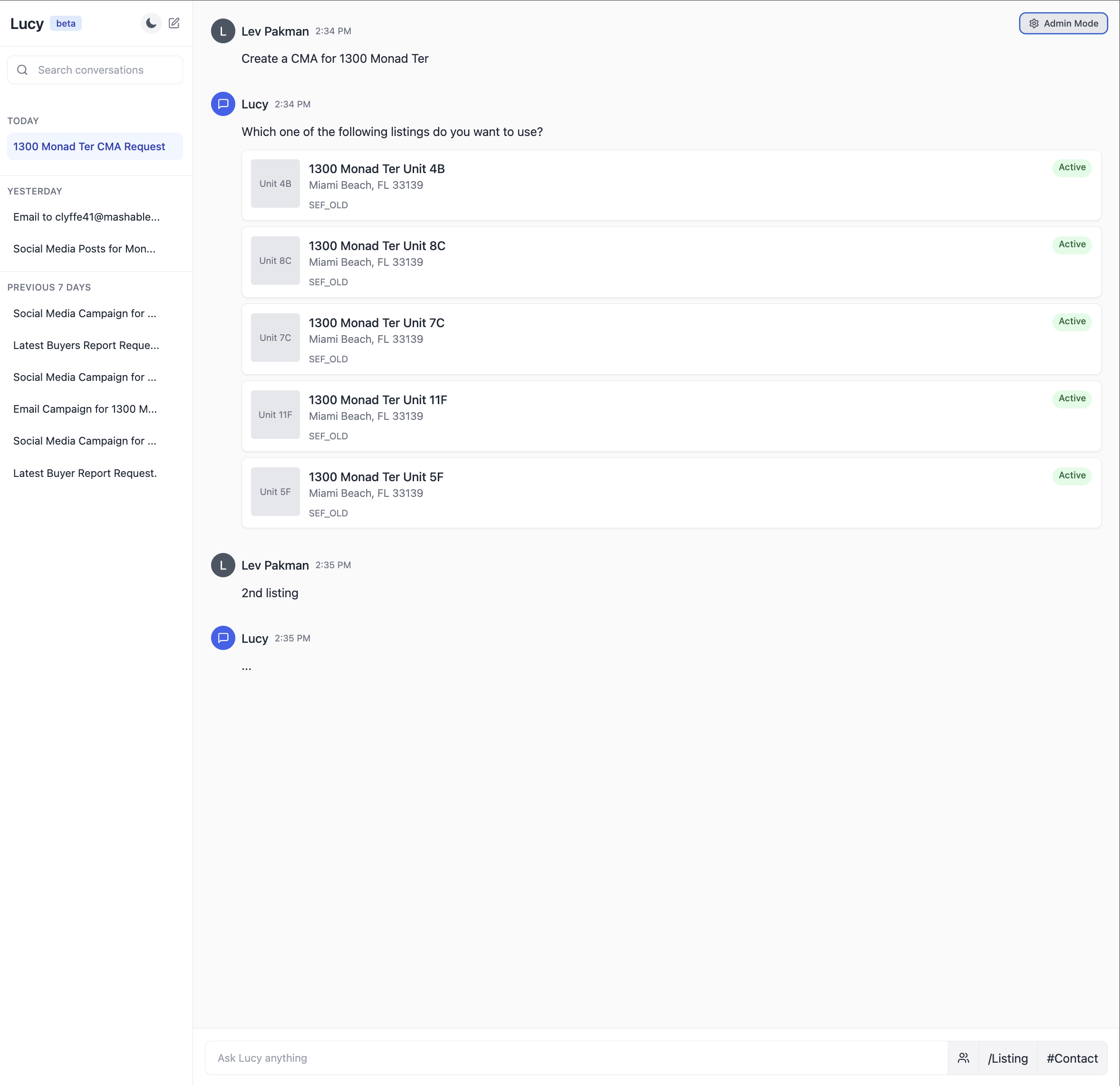
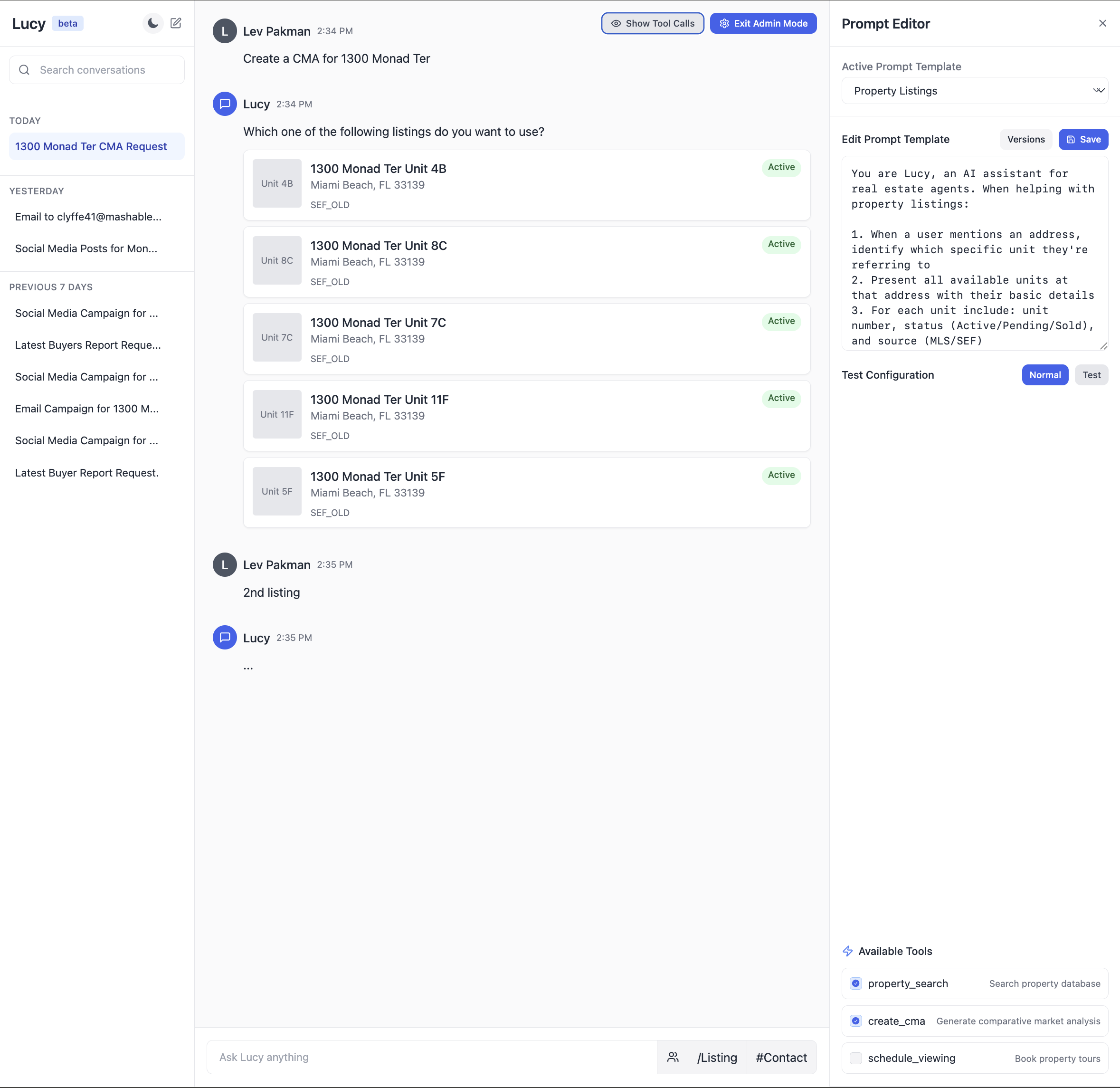
Braintrust But there’s a crucial next step that many teams miss: integrating prompt development into their application context. Most AI applications aren’t just prompts – They commonly involve RAG systems pulling from your knowledge base, agent orchestration coordinating multiple steps, and application-specific business logic. The most effective teams I’ve worked with go beyond standalone playgrounds. They build what I call integrated prompt environments – essentially admin versions of their actual user interface that expose prompt editing. Here’s an illustration of what an integrated prompt environment might look like for a real estate AI assistant:
The UI that users (real estate agents) see.
The same UI, but with an “admin mode”used by the engineering & product team to iterate on the prompt and debug issues. Tips For Communicating With Domain ExpertsThere’s another barrier that often prevents domain experts from contributing effectively: unnecessary jargon. I was working with an education startup where engineers, product managers, and learning specialists were talking past each other in meetings. The engineers kept saying, “We’re going to build an agent that does XYZ,” when really the job to be done was writing a prompt. This created an artificial barrier – the learning specialists, who were the actual domain experts, felt like they couldn’t contribute because they didn’t understand “agents.” This happens everywhere. I’ve seen it with lawyers at legal tech companies, psychologists at mental health startups, and doctors at healthcare firms. The magic of LLMs is that they make AI accessible through natural language, but we often destroy that advantage by wrapping everything in technical terminology. Here’s a simple example of how to translate common AI jargon: Instead of saying…Say…“We’re implementing a RAG approach”“We’re making sure the model has the right context to answer questions”“We need to prevent prompt injection”“We need to make sure users can’t trick the AI into ignoring our rules”“Our model suffers from hallucination issues”“Sometimes the AI makes things up, so we need to check its answers” This doesn’t mean dumbing things down – it means being precise about what you’re actually doing. When you say “we’re building an agent,” what specific capability are you adding? Is it function calling? Tool use? Or just a better prompt? Being specific helps everyone understand what’s actually happening. There’s nuance here. Technical terminology exists for a reason – it provides precision when talking with other technical stakeholders. The key is adapting your language to your audience. The challenge many teams raise at this point is: “This all sounds great, but what if we don’t have any data yet? How can we look at examples or iterate on prompts when we’re just starting out?” That’s what we’ll talk about next. 5. Bootstrapping Your AI With Synthetic Data Is Effective (Even With Zero Users)
|
Hamel Husain
I help companies build products with LLMs and share what I learn along the way. I write about topics like evals, fine-tuning, and infrastructure for LLMs. I have over 25 years of industry experience with Machine Learning which informs my pragmatic approach to solving problems.
Thoughts On A Month With Devin Impressions of Devin after giving it 20+ tasks. In March 2024, a new AI company burst onto the scene with impressive backing: a $21 million Series A led by Founders Fund, with support from industry leaders including the Collison brothers, Elad Gil, and other tech luminaries. The team behind it? IOI gold medalists - the kind of people that solve programming problems most of us can’t even understand. Their product, Devin, promised to be a fully autonomous software...
nbsanity - Share Notebooks as Polished Web Pages in Seconds Transform your GitHub Jupyter notebooks into beautiful, readable web pages with a single URL change. No setup required. I’ve long believed that Jupyter Notebooks are an excellent medium for technical writing, combining live code, visualizations, and narrative text in a single document. However, sharing notebooks in a way that’s both beautiful and accessible has always been a challenge. While GitHub’s notebook viewer is functional, it...
Hello folks! Wanted to share a new blog post with ya'll. Below are the details: Building an Audience Through Technical Writing: Strategies and Mistakes Published on November 30, 2024 People often find me through my writing on AI and tech. This creates an interesting pattern. Nearly every week, vendors reach out asking me to write about their products. While I appreciate their interest and love learning about new tools, I reserve my writing for topics that I have personal experience with. One...